MAC Address

MAC Address, including its purpose, types, how to find it on different devices, and how it helps identify devices on a network securely.
MAC Address, including its purpose, types, how to find it on different devices, and how it helps identify devices on a network securely.
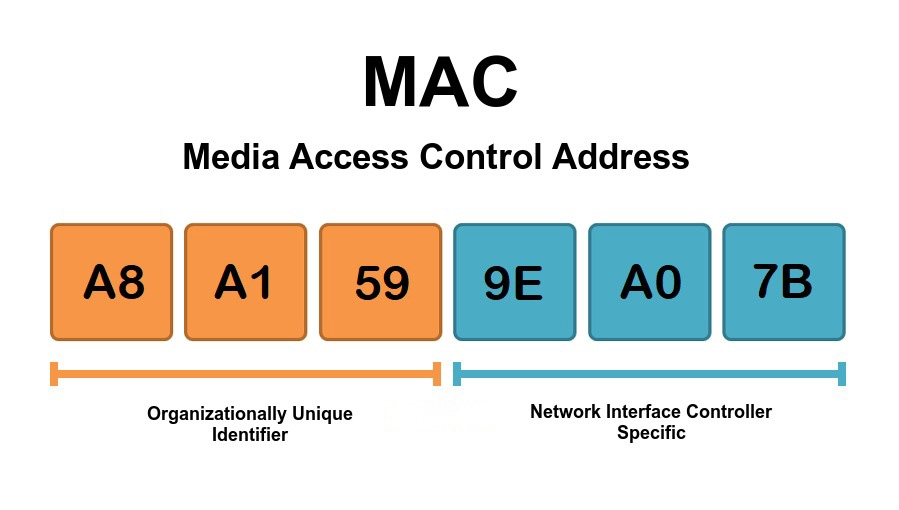
A MAC Address is a unique identification number assigned to every device that connects to a network. The term MAC stands for Media Access Control. It helps routers and networks identify devices such as smartphones, laptops, computers, printers, and smart TVs. Every network-enabled device comes with its own MAC Address created by the manufacturer.
A MAC Address plays an important role in networking and internet communication. It helps routers send data to the correct device connected to the network. Without MAC Addresses, devices on the same network could not communicate properly.
ipconfig /allMAC Address filtering is a security feature available in many routers. It allows only approved devices to connect to the WiFi network. If a device’s MAC Address is not added to the allowed list, it cannot access the internet connection.
This feature helps improve WiFi security and prevents unauthorized users from using your network.
Yes, some devices allow users to change or spoof their MAC Address for privacy or testing purposes. However, changing a MAC Address should only be done for legal and ethical reasons.
Users may face several MAC Address-related issues such as:
A MAC Address is a unique identifier that helps devices communicate securely on a network. It plays an important role in internet connectivity, device recognition, and network security. By understanding how MAC Addresses work, users can easily manage WiFi connections, troubleshoot network problems, and improve overall network performance.